

Your OpenClaw and Telegram setup is wrong. Here's how to do it right.
Multi-agent routing, per-topic skills, and human+AI in one group. Advanced OpenClaw setup on Telegram without losing flexibility or paying per seat.
Written by Admin User
•10 min read
I am a fan of Slack, fan of Discord too but one is heavy, the other one is already noisy so I wanted to keep my on-the-go Mission Control isolated but it was getting tricky for parallel actions, conversation routing etc so during the weekend I was trying to figuring how best I can use telegram features with Openclaw without having to worry about setting up new integration. Here is what I did, and why I feel this is an excellent set up which is light but provides you the flexibility like Discord/Slack would do.
Telegram groups with topics let you organize conversations into separate threads. When you combine this with OpenClaw's multi-agent system, you get something powerful: different AI agents handling different topics, each with their own tools, permissions, and context.
This guide walks through setting up a Telegram group where each topic routes to a specialized agent. Think of it like having a team where the research topic always goes to your research agent, the development topic goes to your coding agent, and general questions go to your coordinator.
What We're Building
A Telegram group with multiple topics, each handled by a different OpenClaw agent. Here's what that looks like in practice:
General topic (thread ID 1): Main agent handles coordination and general questions
Research topic (thread ID 42): Research agent with web search skills only
Development topic (thread ID 99): Developer agent with code execution tools
Alerts topic (thread ID 17): Notifications only, bot disabled
Each topic maintains its own conversation history. Messages in the research topic don't show up in the development topic's context. Different agents can have different tool restrictions, system prompts, and access controls.
Here's our Telegram Setup
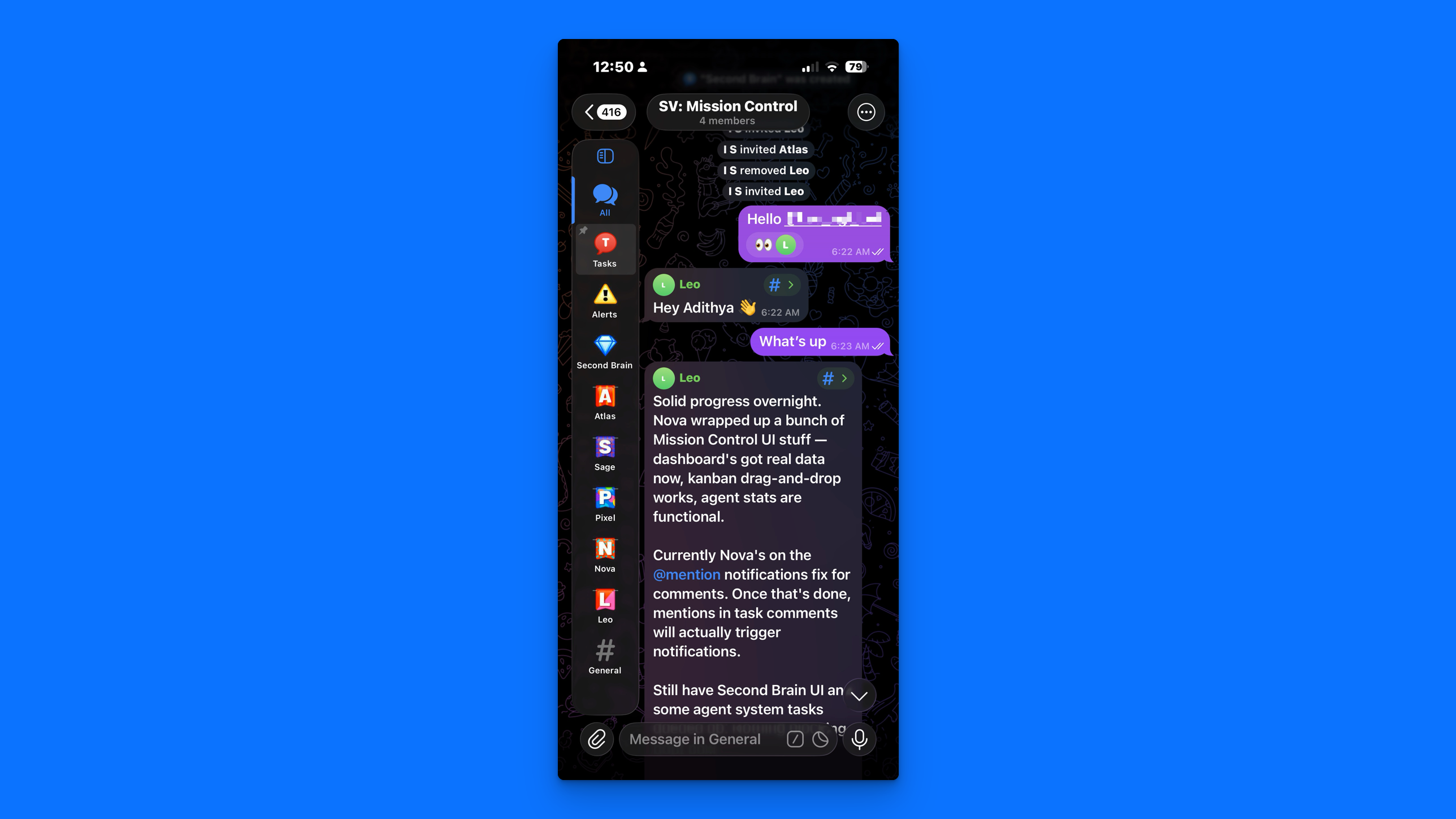
All and General are Telegram's defaults. Everything else is a topic, and each topic is wired to an agent. When I post in Leo's topic, it works like a DM with my squad lead. Same for the rest of the AI team. One group, one bot, but I'm talking to the right agent by choosing the topic. No need to create and manage a separate Telegram bot per team member. Topics are how I interact with each of them.
Those topics can be anything. I have a Second Brain topic. Whatever I post there (a book, a link, a movie), Leo knows to decide the category, apply the right tags, and only then does it show up as a record in my Mission Control. Another topic is Alerts. Daily standup reminders, cron run times, downtime, model alerts. Nothing gets missed because everything has a place.
That gives structure and clarity without the noise you get when OpenClaw and Telegram are set up the usual way: one thread, everything mixed together. Till this point, I haven't seen anyone use Telegram groups with topics like this. Read on for how to set it up and what you can do with it.
Setup & Prerequisites
What You Need
1. Telegram Bot
Create a bot via @BotFather:
/newbot
Save the bot token. You'll need it for OpenClaw config.
Important: Disable Privacy Mode if you want the bot to see all messages (not just mentions):
/setprivacy
[Select your bot]
Disable
If you keep Privacy Mode enabled, make the bot a group admin instead. Either option works.
2. Telegram Supergroup with Topics Enabled
Create a supergroup in Telegram, then enable topics:
- Group Settings → Group Type → Topics
- Toggle "Enable Topics"
You'll see a "General" topic appear automatically (this is thread ID 1).
Create additional topics:
- Tap the topic selector
- "Create Topic"
- Name it (e.g., "Research", "Development", "Alerts")
3. OpenClaw Installed and Running
If you haven't installed OpenClaw yet:
npm install -g openclaw
openclaw init
Make sure your gateway is running:
openclaw gateway status
Add Bot to Group
Add your bot to the Telegram group. If Privacy Mode is enabled, make it an admin. If Privacy Mode is disabled, regular member access works fine.
Getting Chat IDs & Topic IDs
OpenClaw needs two pieces of information to route messages: the group chat ID and the topic thread ID.
Method 1: Forward to @userinfobot (Quick)
For the group chat ID:
- Forward any message from the group to @userinfobot
- Look for the chat ID (negative number like
-1001234567890)
For topic IDs: This method doesn't expose topic IDs. Use Method 2 or 3 below.
Privacy note: @userinfobot is a third-party service. For sensitive groups, use Method 2.
Method 2: OpenClaw Logs (Recommended)
Step 1: Send a test message in each topic
Step 2: Run OpenClaw logs:
openclaw logs --follow
Step 3: Look for the inbound message envelope:
[telegram] ← msg chat=-1001234567890 thread=42 from=alice@123456789 text="test"
Extract:
chat=-1001234567890→ Group IDthread=42→ Topic ID
You can also check the full JSON in logs:
{
  "ChatId": "-1001234567890",
  "MessageThreadId": 42,
  "IsForum": true,
  "From": { "id": 123456789, "username": "alice" }
}
Method 3: Telegram Bot API (Direct)
Step 1: Send a message to your bot in the target topic
Step 2: Fetch updates:
curl "https://api.telegram.org/bot<YOUR_BOT_TOKEN>/getUpdates"
Step 3: Find your message in the response:
{
  "message": {
    "chat": {
      "id": -1001234567890,
      "type": "supergroup"
    },
    "message_thread_id": 42,
    "text": "test"
  }
}
Extract:
message.chat.id→ Group IDmessage.message_thread_id→ Topic ID
Method 4: Session Keys (After First Message)
After the bot receives at least one message, check the session store:
cat ~/.openclaw/agents/main/sessions/sessions.json | jq
Look for session keys matching:
agent:main:telegram:group:-1001234567890:topic:42
Parse out the group ID and topic ID from the key.
Configuration
OpenClaw config lives at ~/.openclaw/config.json5 (or config.yaml if you prefer YAML).
Basic Group with Topics
Start with a simple setup: one agent, multiple topics with different settings.
{
  channels: {
    telegram: {
      enabled: true,
      botToken: process.env.TELEGRAM_BOT_TOKEN,

      // Only allow specific groups
      groupPolicy: "allowlist",

      groups: {
        // Your group ID (get from Method 2 or 3 above)
        "-1001234567890": {
          // Default: require @mention to respond
          requireMention: true,

          // Per-topic overrides
          topics: {
            // General topic (thread ID 1)
            "1": {
              requireMention: false,  // Always respond
              systemPrompt: "You are a helpful coordinator. Keep answers brief."
            },

            // Research topic (thread ID 42)
            "42": {
              requireMention: false,
              skills: ["web_search", "web_fetch"],  // Only these tools
              systemPrompt: "You are a research specialist. Provide citations."
            },

            // Development topic (thread ID 99)
            "99": {
              requireMention: false,
              skills: ["exec", "read", "write", "edit"],
              systemPrompt: "You are a code assistant. Focus on clarity."
            },

            // Alerts topic (thread ID 17)
            "17": {
              enabled: false  // Bot won't respond here
            }
          }
        }
      }
    }
  }
}
What this does:
- General topic: bot always responds, no tool restrictions
- Research topic: bot always responds, but can only use web search tools
- Development topic: bot always responds, but can only use code tools
- Alerts topic: bot is silent (good for notification-only topics)
Per-Topic Settings
Each topic can override these settings:
requireMention (boolean)
If true, bot only responds when @mentioned. If false, bot responds to all messages.
skills (array of strings)
Restricts which tools the bot can use in this topic. If omitted, all enabled tools are available.
allowFrom (array of strings)
Restricts who can trigger the bot. Format: ["@username", "123456789"] (username or user ID).
systemPrompt (string)
Additional instructions prepended to the system prompt for this topic.
enabled (boolean)
Set to false to disable the bot in this topic entirely.
Config Inheritance
Topics inherit settings from the group unless overridden.
{
  channels: {
    telegram: {
      groups: {
        "-1001234567890": {
          // Group-level default
          requireMention: true,
          systemPrompt: "You are a team assistant.",

          topics: {
            "42": {
              // Inherits requireMention: true from group
              // Overrides systemPrompt
              systemPrompt: "You are a research assistant."
            }
          }
        }
      }
    }
  }
}
Resolution order (most specific wins):
- Topic config
- Group config
- Global defaults
Sender Restrictions
Control who can message the bot at three levels:
{
  channels: {
    telegram: {
      // Global: applies to all groups
      groupAllowFrom: ["@admin"],

      groups: {
        "-1001234567890": {
          // Group-level: overrides global
          allowFrom: ["@teamlead", "123456789"],

          topics: {
            "99": {
              // Topic-level: overrides group
              allowFrom: ["@developer", "111222333"]
            }
          }
        }
      }
    }
  }
}
Resolution: Topic > Group > Global (most specific wins).
Topic Structure & Usage
Here's a practical topic structure for a multi-agent team setup:
General (Thread ID 1)
Purpose: Coordination, general questions, status updates
Agent: Main/coordinator agent
Settings:
"1": {
  requireMention: false,
  systemPrompt: "You are the team coordinator. Answer questions and delegate tasks."
}
Special handling: Telegram rejects message_thread_id: 1 when sending messages to General. OpenClaw handles this automatically (omits the thread ID on sends, includes it on typing indicators).
Tasks (Thread ID 2)
Purpose: Task management, project planning
Agent: Main agent or dedicated task agent
Settings:
"2": {
  requireMention: false,
  skills: ["mission_control", "cron"],  // If you have these skills
  systemPrompt: "Focus on task tracking and project management."
}
Alerts (Thread ID 17)
Purpose: Automated notifications (cron jobs, webhooks, monitoring)
Agent: None (bot disabled)
Settings:
"17": {
  enabled: false  // Bot won't respond
}
Use this topic for one-way notifications. Send messages via cron or external scripts, but the bot stays silent.
Agent-Specific Topics (Thread IDs 62-66)
Purpose: Dedicated channels per agent
Agents: Different agent per topic
Settings:
"62": {
  requireMention: false,
  skills: ["web_search", "web_fetch"],
  systemPrompt: "You are Sage, the research analyst."
},
"63": {
  requireMention: false,
  skills: ["exec", "read", "write", "edit"],
  systemPrompt: "You are Nova, the developer."
},
"64": {
  requireMention: false,
  skills: [],  // Content writing doesn't need special tools
  systemPrompt: "You are Pixel, the content writer."
}
Pair these with agent bindings (see next section) to route each topic to a different agent.
Routing: DM Binding vs Topic Facilitation
OpenClaw has two ways to route messages to specific agents: bindings and facilitation. Here's when to use each.
DM Binding (Direct Routing)
Use case: Route a specific peer (user, group, or topic) to a specific agent.
How it works: OpenClaw checks bindings when a message arrives. If a binding matches, that agent handles the session. No facilitation needed.
Config:
{
  agents: {
    list: [
      { id: "main", role: "lead" },
      { id: "research", role: "analyst" },
      { id: "dev", role: "engineer" }
    ]
  },

  bindings: [
    // Research topic → research agent
    {
      match: {
        channel: "telegram",
        group: "-1001234567890",
        topic: "42"
      },
      agentId: "research"
    },

    // Dev topic → dev agent
    {
      match: {
        channel: "telegram",
        group: "-1001234567890",
        topic: "99"
      },
      agentId: "dev"
    },

    // Default: everything else → main agent
    {
      match: {
        channel: "telegram",
        group: "-1001234567890"
      },
      agentId: "main"
    }
  ]
}
Result:
- Message in topic 42 →
agent:research:telegram:group:-1001234567890:topic:42 - Message in topic 99 →
agent:dev:telegram:group:-1001234567890:topic:99 - Message in any other topic →
agent:main:telegram:group:-1001234567890:topic:<id>
When to use:
- You want different agents to own different topics
- Each agent has its own workspace, memory, and tool policies
- Clean separation of concerns
Topic Facilitation (Dynamic Routing)
Use case: One agent receives the message, then decides which other agent should handle it.
How it works: The receiving agent uses sessions_send to forward the message to another agent's session.
Example: User sends a message to General topic. Main agent reads it, decides it's a research question, and forwards it to the research agent's session.
When to use:
- Dynamic routing based on message content
- One agent acts as a dispatcher/coordinator
- You want centralized decision-making
Why you might not need it for topics: Bindings are simpler and more reliable. Use facilitation when you need runtime logic (e.g., "route this to research agent if the message contains 'search'"), not for static topic routing.
Multi-Bot Setup (Alternative)
Instead of one bot with multiple agents, you can run multiple bots (one per agent).
One Bot Per Agent
Setup:
- Create 3 bots in @BotFather
- Add all 3 to the same Telegram group
- Configure each bot to listen to different topics
Config (per agent):
Agent 1 (main):
{
  channels: {
    telegram: {
      botToken: process.env.MAIN_BOT_TOKEN,
      groups: {
        "-1001234567890": {
          topics: {
            "1": { requireMention: false }
          }
        }
      }
    }
  }
}
Agent 2 (research):
{
  channels: {
    telegram: {
      botToken: process.env.RESEARCH_BOT_TOKEN,
      groups: {
        "-1001234567890": {
          topics: {
            "42": { requireMention: false }
          }
        }
      }
    }
  }
}
Agent 3 (dev):
{
  channels: {
    telegram: {
      botToken: process.env.DEV_BOT_TOKEN,
      groups: {
        "-1001234567890": {
          topics: {
            "99": { requireMention: false }
          }
        }
      }
    }
  }
}
Pros and Cons
Single bot + bindings:
- One bot to manage
- Simpler group permissions
- One bot token to secure
- All agents share the same bot identity
Multiple bots:
- Each agent has a distinct identity (name, avatar)
- Users see which agent is responding
- Complete isolation (no shared state)
- More bots to create and manage
- More tokens to secure
- Group gets crowded with multiple bots
Recommendation: Start with single bot + bindings. Switch to multi-bot only if you need distinct bot identities per agent.
Human + AI: One Group, One Team
Here's what makes this setup truly powerful: your AI agents don't have to live in isolation. They can share the Telegram group with your actual human team.
Your developers, designers, and PMs are already in a Telegram group. Now add your AI agents to the same group. There are two natural ways this plays out.
Pattern 1: Dedicated Agent Topics
Each agent owns a topic. Your human team knows exactly where to go. Need research? Post in the Research topic. Need code? Post in the Development topic. The bindings route each topic to the right agent automatically, with no ambiguity and no dispatcher overhead.
Your team treats these topics like specialist desks. Walk up, ask your question, get your answer. All within the same group where the rest of your team communication happens.
[Research Topic — bound to ResearchBot]
@alice: Find me recent benchmarks on RAG vs fine-tuning for domain-specific QA
ResearchBot: Found 4 relevant papers from 2025... [summary + links]
@bob: How does this compare to what Anthropic published last month?
ResearchBot: Based on Anthropic's March 2025 report... [comparison]

[Development Topic — bound to DevBot]
@charlie: Scaffold a FastAPI endpoint that takes a PDF and returns extracted entities
DevBot: Here's the implementation... [code block]
@charlie: Add error handling for corrupted PDFs
DevBot: Updated... [revised code]
Since requireMention is false on these dedicated topics, the agent responds to every message. No need to tag. Your team just posts and gets answers.
Pattern 2: Coordinator Facilitation
Alternatively, your team posts everything in the General topic and lets the coordinator agent figure out what to do with it. The main agent reads the message, determines whether it's a research question, a dev task, or a content request, and uses sessions_send to forward it to the right specialist agent. The result comes back through the coordinator or gets posted directly to the relevant topic.
This works well when your team doesn't want to think about which topic to use. They just talk to one bot and it handles delegation behind the scenes.
[General Topic — bound to CoordinatorBot]
@alice: I need benchmarks on RAG vs fine-tuning and also a FastAPI endpoint for PDF entity extraction
CoordinatorBot: On it. Routing research to Sage and the endpoint request to Nova.

[Research Topic]
ResearchBot: @alice — found 4 relevant papers... [summary + links]

[Development Topic]
DevBot: @alice — here's the FastAPI scaffold... [code block]
Mix Both
Nothing stops you from combining the two. Dedicated topics for team members who know what they want, plus a General topic with a coordinator for everything else. Power users go direct. Everyone else gets routed.
Why This Matters If You're Not on Slack or Discord
If your team already lives in Slack or Discord, you have plugin ecosystems and integrations to lean on. But if your team uses Telegram, or if you're a small team that doesn't want to pay for Slack or manage a Discord server, this setup gives you something those platforms charge for: AI teammates that your human teammates can interact with natively, in the same workspace, with zero friction.
No new app to install. No integration to maintain. No per-seat AI add-on fee. Just add bots to your group, configure topics, and your whole team (human and AI) is working in the same place.
Configuration tip: For topics where both humans chat and an agent is bound, set requireMention: true so the bot only responds when explicitly tagged and stays out of human-to-human conversation. For agent-dedicated topics, set it to false so every message gets a response.
Examples
Sending to Specific Topics
From CLI:
openclaw message send \
  --channel telegram \
  --target "-1001234567890:topic:42" \
  --message "Research update: found 5 relevant papers"
From cron job:
{
  schedule: { kind: "cron", expr: "0 9 * * *" },
  payload: {
    kind: "agentTurn",
    message: "Daily standup reminder",
    deliver: true,
    channel: "telegram",
    to: "-1001234567890:topic:2"
  },
  sessionTarget: "isolated"
}
Shorthand (numeric suffix):
-1001234567890:42 // same as -1001234567890:topic:42
Agent-to-Agent via Topics
Scenario: Main agent delegates research to research agent, posts result to research topic.
Main agent action:
// Main agent receives question in General topic
// Delegates to research agent
sessions_send(
  sessionKey: "agent:research:main",
  message: "Find papers on neural scaling laws"
)

// Research agent does the work, then posts result
// (from research agent's session)
message(
  action: "send",
  channel: "telegram",
  target: "-1001234567890:topic:42",
  message: "Found 5 papers: [links]"
)
Notification Routing
Scenario: External monitoring system posts alerts to Alerts topic.
Webhook receiver (external):
curl -X POST "https://api.telegram.org/bot<TOKEN>/sendMessage" \
  -d chat_id=-1001234567890 \
  -d message_thread_id=17 \
  -d text="🚨 Server CPU at 95%"
OpenClaw cron (internal):
{
  schedule: { kind: "every", everyMs: 300000 },  // Every 5 min
  payload: {
    kind: "agentTurn",
    message: "Check server health and post to Alerts topic if needed",
    deliver: true,
    channel: "telegram",
    to: "-1001234567890:topic:17"
  }
}
Limitations & Future
What Works Today
- Per-topic session isolation: Each topic maintains separate conversation history
- Per-topic configuration: Skills, prompts, mention gating, sender restrictions
- Multi-agent routing: Different agents per topic via bindings
- Topic threading: Replies include
message_thread_id, stay in correct topic - Typing indicators: Show in the correct topic
- General topic handling: Special case (thread ID 1) handled automatically
Current Gaps
- Topic metadata fetching: No built-in tool to list topics in a group or get topic names/descriptions. You only see thread IDs.
Workaround: Manually map thread IDs to names in comments or a separate doc.
- Dynamic topic creation: Agents can't create new topics via OpenClaw. Topics must be created manually in Telegram UI.
Potential future: createForumTopic tool (Telegram API supports this).
- Topic-level message search: No "search messages in topic 42" tool. Can't fetch message history per topic via OpenClaw.
Workaround: Use Telegram's native search manually.
- Cross-topic context sharing: Topics are strictly isolated. An agent in topic 42 can't see what happened in topic 99.
Workaround: Shared memory files or database outside session context. Or use facilitation to pass context explicitly.
- Topic-aware heartbeats: Group/topic sessions don't trigger heartbeats. Only main session and DM sessions get heartbeat polls.
Why: Heartbeats are for "check-in with the agent" flows. Groups/topics are reactive (respond to messages), not proactive.
Workaround: Use cron jobs to post proactive messages to topics.
- Topic rename/close detection: No event hooks when topics are renamed or closed in Telegram.
Workaround: Update config manually when topic structure changes.
Potential Enhancements
Short-term:
- Tool to list topics in a group (via Bot API)
- Map thread IDs to topic names in context
- Topic creation tool (agents can create new topics on demand)
Long-term:
- Cross-topic memory (opt-in context sharing between topics)
- Topic-level message history fetch
- Lifecycle hooks (topic created/renamed/closed events)
Community feedback welcome: If you're using topics and hit a limitation, post in OpenClaw Discord or open a GitHub issue.
Quick Reference
Session Key Patterns
| Context | Session Key |
|---|---|
| DM | agent:main:telegram:dm:123456789 |
| Non-forum group | agent:main:telegram:group:-1001234567890 |
| Forum topic | agent:main:telegram:group:-1001234567890:topic:42 |
| General topic | agent:main:telegram:group:-1001234567890:topic:1 |
Config Hierarchy (Most Specific Wins)
Sender allowlists:
channels.telegram.groups.<groupId>.topics.<topicId>.allowFromchannels.telegram.groups.<groupId>.allowFromchannels.telegram.groupAllowFrom
Mention gating:
channels.telegram.groups.<groupId>.topics.<topicId>.requireMentionchannels.telegram.groups.<groupId>.requireMention- Global default (
true)
Skills:
channels.telegram.groups.<groupId>.topics.<topicId>.skillschannels.telegram.groups.<groupId>.skills- Agent's global skill policy
Getting Started Checklist
- Create Telegram bot via @BotFather, save token
- Disable Privacy Mode (or make bot admin)
- Create supergroup, enable topics
- Create topics (General auto-created, add more as needed)
- Get group ID (forward message to @userinfobot or check logs)
- Get topic IDs (send test messages, check
openclaw logs) - Configure
config.json5with group and topic settings - Test: send message to each topic, verify routing
- Check session keys in logs (confirm
:topic:<id>suffix) - Add bindings if using multi-agent routing
Troubleshooting
Bot not responding in topics:
- Check Privacy Mode (disabled or bot is admin?)
- Verify group ID in
channels.telegram.groups - Check
topics.<id>.enabled(notfalse?) - Verify
requireMentionsetting (do you need to @mention?) - Check sender allowlists (is your user ID allowed?)
Wrong agent responding:
- Check binding order (most specific first in array)
- Verify peer ID format:
group: "<chatId>", topic: "<threadId>" - Check session key in logs (should match binding pattern)
Topics not isolated:
- Check session keys in logs (each topic should have unique
:topic:<id>) - Verify OpenClaw version (topics supported in recent releases)
- Confirm group is a forum supergroup (
IsForum: truein logs)
Is not being code savvy stopping you from setting up OpenClaw? Get Started Here.
Feel free to join Vibers.Club as well.

 Emergent — An agentic vibe-coding platform that builds production-ready apps